


SO VEGAN: Healthy Recipes
4.423.00 Reviews
App Specs
- Version
- 3.2.198
- Updated On
- License
- Free
- Downloads
- 10,000+
- Developer
- SO VEGAN
- Categories
- Food & Drink
- Platform
- Android
Screenshots
 Analysis by AppCompare
The first week with a new recipe app is usually the easy part: every dish looks like a possibility, and even a quick dinner can feel like a small project worth trying. SO VEGAN: Healthy Recipes makes a promising first impression for anyone who wants plant-based meals to feel practical rather than intimidating. I’d judge its lasting value less by how many recipes I save at the start and more by whether I return to it when I’m tired, short on time, or trying to use what is already in the kitchen.
A quick start that can become a cooking habit
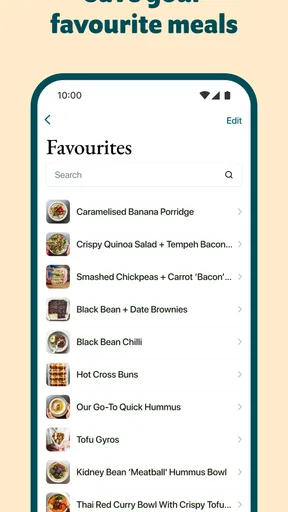
In that early browsing stage, a large recipe collection is useful only if it helps me make a decision. The appeal here is the combination of food ideas, cooking videos, and a shopping list in one place: I can move from inspiration toward a plan without immediately switching to a separate notes app. That makes the app especially approachable for someone learning to cook vegan meals, or for a household that wants a few dependable meat-free dinners each week rather than a complete lifestyle overhaul.
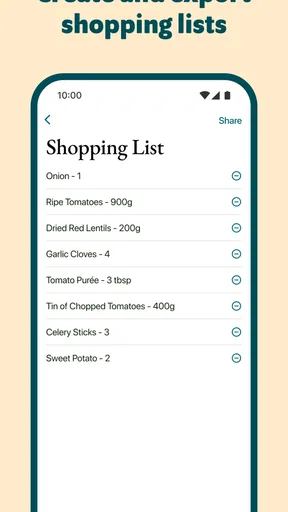
A realistic first use might be choosing a weeknight meal before leaving for the grocery store. I’d open a recipe, check its ingredients, and add what I need to the shopping list while the plan is still fresh. The practical benefit is not just remembering the ingredients; it is reducing the gap between “that looks good” and actually cooking it. For a beginner, following a video alongside written steps can also make an unfamiliar preparation feel less like guesswork.
Still, I wouldn’t treat every recipe app as a complete meal planner. This one is best approached as a source of dishes and a way to gather ingredients, while you decide how those meals fit your schedule, budget, and pantry. If you need an app to automatically organize a full week around dietary targets or household preferences, a dedicated planning tool may suit you better.
What remains useful after the novelty wears off
The longer-term question is whether the collection can support repeat cooking rather than endless browsing. A broad range of meal types gives me more chances to find recipes for different moments: something simple for a work night, a more involved dish when I have time, or a dessert when I want to make a meal feel complete. The strongest routine is likely to come from keeping a small personal rotation of recipes I genuinely enjoy, then using new ideas to refresh it gradually.
I’d also use the shopping list selectively. Before adding ingredients, I’d check the cupboards and fridge, then compare the recipe’s needs with what I already have. That small step helps prevent duplicate purchases and makes the list more useful as a real shopping aid instead of a second copy of every recipe’s ingredient section. When cooking for more than one person, it is worth checking quantities and making any needed adjustments before heading out.
SO VEGAN is a free food-and-drink app from SO VEGAN, with optional in-app purchases priced from $3.49 to $29.99 per item. It has a 4.4 average from 306 ratings, with 21 written reviews and over 10K installs. Those figures suggest that it has found an audience, but I’d still decide based on whether its recipe style suits the food I actually like to eat. It is rated for Everyone, and the current version is 3.2.192, so it is an option for a broad range of home cooks; the free starting point also makes it easy to explore before deciding whether any paid extras are worthwhile.
Worth Reading Before You Choose

Flipboard Shows What News Apps Must Do Beyond the Feed

Switching to Android Auto Means Rethinking Your Driving Routine

Google Calendar Makes a Crowded Week Easier to Manage

Ludo King Makes the Most of the Minutes Between Plans

Baby Panda World Brings Quick Play to Modern Phones, but Its Game Library Feels Busy

ESPN’s Live Game View Makes Following Close Games Easier
Small trade-offs that matter in everyday use
Video guidance is helpful when a cooking technique is new, but it is not always the quickest way to check one detail while your hands are messy. In that moment, concise written instructions are easier to scan than replaying a clip. I’d use videos before cooking to understand the overall process, then keep the recipe steps handy at the counter. That workflow makes the visual help a bonus rather than something the whole meal depends on.
Dietary labels and nutrition information can also help narrow down choices, but I would treat them as screening tools, not a substitute for checking ingredients carefully. If an allergy or strict dietary requirement affects what you can safely eat, read the full recipe and verify every ingredient rather than relying on a tag alone. Likewise, nutrition details can help with general awareness, but they do not automatically make a recipe a good match for every individual goal.
Compared with searching the web, a focused recipe app can feel calmer: the recipes, videos, and shopping-list workflow are gathered around cooking rather than mixed into a general search feed. A web search may still be better when I want a very specific regional dish, a particular ingredient substitution, or several competing versions of the same recipe. Compared with a basic digital cookbook, the shopping list and videos are more directly useful during preparation, while a printed book can be nicer if I want to browse away from a screen. Which is better depends on whether I value convenience, breadth, or a particular cooking style most.
Discovering the App
Picture this: You open the app and are immediately greeted by a vibrant interface that feels like a breath of fresh air. The design is clean, with a focus on beautiful food photography that makes you want to dive right in. The home page is intuitive, offering easy navigation through different categories. Whether you’re a seasoned vegan or just dabbling in plant-based meals, SO VEGAN: Healthy Recipes caters to all levels of culinary expertise.
Exploring Features
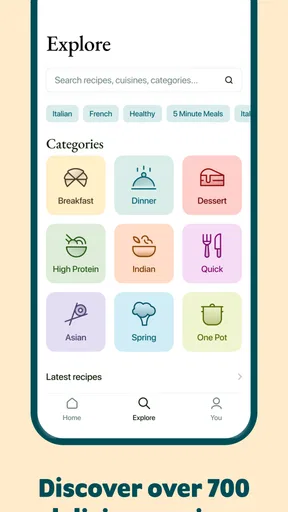
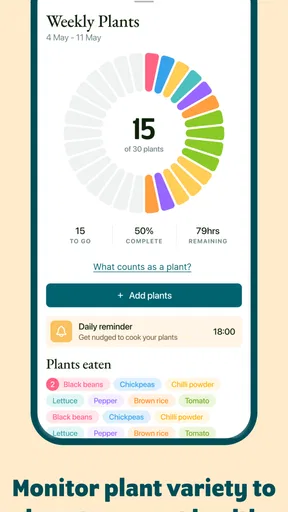
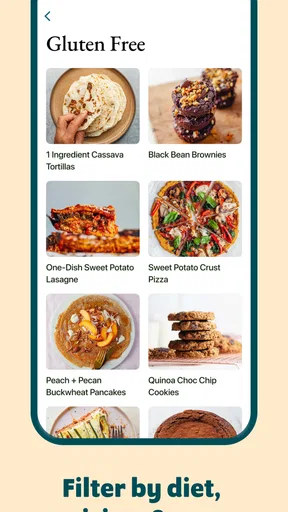
One of the first things I noticed was the variety of recipes available. From breakfasts that will kickstart your day to comforting dinners and even indulgent desserts, this app has it all. Each recipe is clearly labeled with dietary tags, so if you’re gluten-free or nut-free, you’re covered. The app also offers nutritional information, which is a godsend for those keeping an eye on their intake.
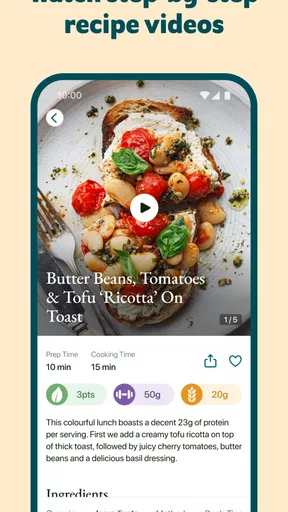
Now, let’s talk about the recipe instructions. They’re straightforward and easy to follow, with step-by-step guides that even a kitchen newbie can handle. There’s also a handy shopping list feature that lets you add ingredients directly from recipes. It’s a real time-saver, especially when you’re planning meals for the week.
Cooking with Confidence
One of the standout features is the video tutorials. It feels as though you have a personal chef guiding you through each dish. The videos are short, engaging, and packed with tips that can help elevate your cooking skills. It’s like having a mini cooking class right on your phone!
Another thing I love is the community aspect of the app. Users can leave comments and ratings on recipes, which helps you decide which dish to try next. Plus, the community is super supportive, offering tweaks and suggestions to make the recipes even better.
Keeping it useful without letting it become a chore
To keep a recipe app useful beyond the first burst of enthusiasm, I’d make the routine deliberately small. Pick one new dish for the week, rather than trying to overhaul every meal, and pair it with a familiar fallback. If the new recipe works, save the idea in your own mental rotation; if it doesn’t, move on without feeling that the time spent browsing has to be justified. This approach suits SO VEGAN’s role as an inspiration and cooking companion better than expecting it to dictate every meal.
One useful trade-off is deciding when to follow a recipe closely and when to improvise. When a dish depends on a technique you are learning, I’d stick to the instructions and use the video to understand the sequence. When the recipe is familiar or the ingredients are flexible, checking the fridge first can help reduce waste. But for baking or a dish where proportions matter, casual substitutions may change the result, so I’d be more cautious and follow the stated quantities.
The app is a particularly good fit for someone who wants approachable plant-based ideas, visual help, and a way to collect ingredients while planning a shop. It may be less satisfying for a confident cook who already has a large personal recipe library and mainly wants advanced culinary techniques, or for someone who needs a highly tailored meal plan. If you dislike cooking from a phone, prefer recipes organized entirely around your own dietary rules, or want a tool to calculate a household’s complete shopping needs automatically, another format or a specialist planner could be a better match.
Why It Stands Out
What really sets this app apart is its commitment to simplicity and accessibility. The creators have done a fantastic job of making vegan cooking approachable for everyone. The app doesn’t just provide recipes; it inspires you to explore a plant-based lifestyle without feeling like a chore.
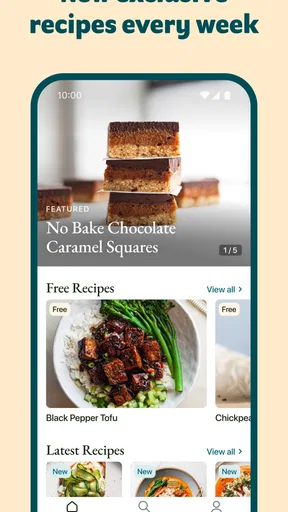
Plus, the app gets regular updates, with new recipes added frequently. This keeps things fresh and exciting, ensuring you never run out of new dishes to try. The developers clearly have their finger on the pulse of the vegan community, often featuring seasonal recipes and trending ingredients.
Choosing it for the long run
For me, lasting value comes from whether the app makes ordinary decisions easier: what to cook tonight, what ingredients to buy, and how to approach a dish I have not made before. The collection and videos can help with those recurring questions, while the shopping list offers a modest but practical bridge from browsing to cooking. The main maintenance burden is personal rather than technical: you still need to choose recipes that fit your week, check what is already at home, and make room for meals you will genuinely want to repeat.
Fatigue is possible if I browse without a plan. A large choice of recipes can turn into another stream of appealing images rather than a useful cooking habit, especially when I keep saving ideas but rarely make them. I’d avoid that by searching with a specific need in mind—such as a breakfast, a dinner, or a dish for ingredients I already have—and by trying recipes at a pace that leaves time to learn them. The app is more valuable as a practical kitchen reference than as something to scroll through for its own sake.
Final Thoughts
In a world where convenience and health often seem at odds, SO VEGAN: Healthy Recipes manages to bridge the gap beautifully. It’s more than just a recipe app; it’s a tool that empowers you to make healthier choices without sacrificing flavor or creativity in the kitchen.
For anyone curious about vegan cooking, or even those looking to add a few meatless meals to their rotation, this app is a must-try. So, what are you waiting for? Dive into the delicious world of SO VEGAN: Healthy Recipes and let your culinary adventures begin!
My long-term verdict
I’d recommend giving it a place on your phone if you want fresh plant-based cooking ideas and appreciate having recipe guidance and a shopping list together. The free entry point makes trying that routine low-commitment, though optional purchases mean it is sensible to check what is included before spending. It is not a substitute for individualized dietary advice or a hands-off meal planner, and it will not remove the need to shop thoughtfully. But if you use it to find a few recipes you’ll actually cook again, rather than trying to make use of every option, it has a realistic chance of earning lasting space after the novelty fades.
Pros
- User-friendly interface simplifies navigation.
- Vast array of diverse vegan recipes.
- Includes nutritional info for each dish.
- Regular updates with new recipes.
- Offline access to saved recipes.
Cons
- Limited search functionality.
- Some recipes require rare ingredients.
- No community interaction feature.
- Ads can be distracting at times.
- No meal planning feature available.
FAQs for SO VEGAN: Healthy Recipes
What types of recipes are available on SO VEGAN: Healthy Recipes?
SO VEGAN: Healthy Recipes offers a diverse range of plant-based recipes, including breakfast, lunch, dinner, snacks, and desserts. Whether you're looking for quick meals, globally inspired dishes, or comfort food favorites, the app provides step-by-step instructions and nutritional information for all recipes.
Is SO VEGAN: Healthy Recipes suitable for beginners?
Absolutely! The app is designed to be user-friendly for cooks of all skill levels. Each recipe comes with clear, easy-to-follow instructions and tips to help beginners succeed in preparing delicious vegan meals. There are also video guides available for more complex recipes.
Does the app offer any meal planning or shopping list features?
Yes, SO VEGAN: Healthy Recipes includes a meal planning feature that helps you organize your meals for the week. Additionally, there's a shopping list function that allows you to add ingredients directly from recipes, ensuring you have everything you need when grocery shopping.
Are there any in-app purchases or subscriptions required?
SO VEGAN: Healthy Recipes offers a free version with access to a variety of recipes. However, there is also a premium subscription available that unlocks additional features such as exclusive recipes, ad-free browsing, and detailed nutritional breakdowns.
Can I customize recipes to fit my dietary needs?
Yes, the app provides options to adjust recipes based on dietary preferences and restrictions. Whether you need to avoid gluten, nuts, or soy, many recipes include substitution suggestions to accommodate various dietary needs without compromising on taste.


